


Warehouse Management Systems | DNC Automation Malaysia
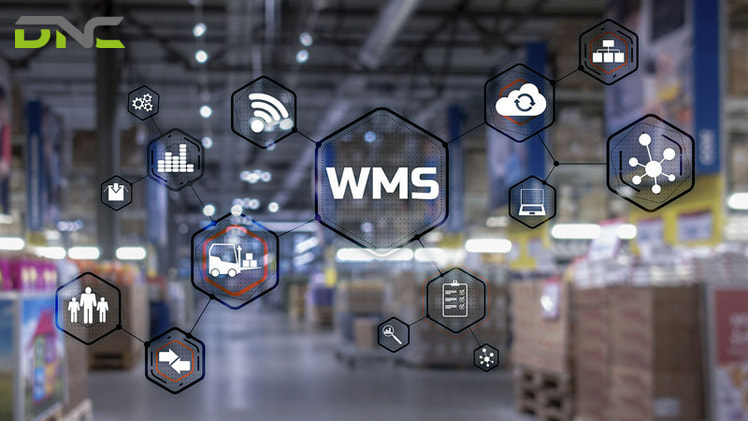
A warehouse management system (WMS) is software that controls and optimises the movement and storage of materials within a warehouse or distribution centre. It directs receiving, putaway, picking, packing, and shipping activities in real time, maintaining accurate inventory locations, managing labour, and interfacing with enterprise resource planning (ERP) systems at the business level and automated equipment (ASRS, conveyors, robotic systems) at the operational level.
In Malaysia’s evolving manufacturing and logistics environment — characterised by rising labour costs, increasing SKU complexity, and growing customer service expectations — WMS software has become a critical operational infrastructure investment, not merely an inventory tracking tool.
What Does a Warehouse Management System Do?
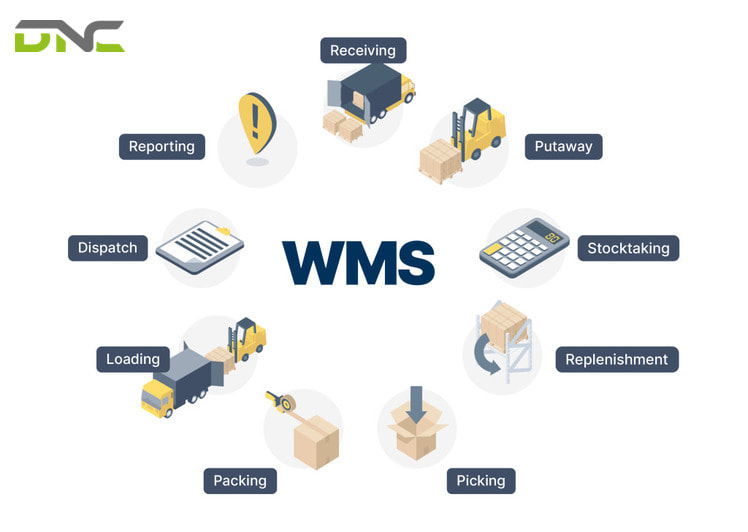
A WMS manages the warehouse as a real-time system. Its core functions:
Receiving and Putaway
The WMS processes advance shipping notices (ASNs) from suppliers, assigns expected receipts to receiving docks, and upon physical receipt, directs putaway of goods to optimal storage locations based on SKU velocity, size, weight, temperature requirements, and available space.
For automated warehouses with ASRS, the WMS communicates putaway instructions to the warehouse control system (WCS), which directs the physical equipment (cranes, shuttles, conveyors) to move pallets or totes to assigned locations.
Inventory Management
The WMS maintains the exact location, quantity, lot number, expiry date, and status of every item in the warehouse. Inventory transactions are recorded in real time as goods move — putaway, pick, replenishment, stock count, damage, disposal.
This real-time visibility supports:
- Cycle counting (systematic physical counts without full warehouse shut-down)
- FIFO and FEFO management (first in first out; first expired first out)
- Lot traceability for food safety and pharmaceutical compliance
- Inventory accuracy audits required by ISO, GMP, and halal certification schemes
Order Management and Picking
The WMS receives outbound orders from the ERP or order management system, groups them into efficient pick waves, and assigns picking tasks to operators or automated systems.
Wave planning algorithms minimise operator travel distance, balance workload across picking zones, and sequence orders to meet shipping deadlines.
Shipping and Dispatch
The WMS manages outbound processing — packing, weighing, labelling, and dock assignment — and confirms shipment to the ERP, triggering invoicing and inventory deduction.
Labour Management
Advanced WMS platforms include labour management modules that set engineered time standards for each warehouse task, compare actual performance to standard, and identify productivity gaps by operator, zone, and shift.
Reporting and Analytics
WMS reporting provides visibility into inventory turnover, order fulfilment rates, picking accuracy, dock utilisation, and labour productivity — the operational data needed to manage warehouse performance.
Types of Warehouse Management Systems
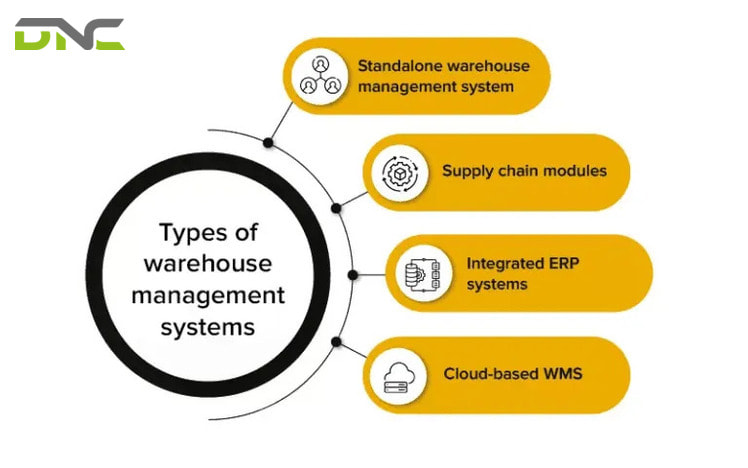
Standalone WMS
A dedicated WMS designed specifically for warehouse operations. Standalone WMS platforms offer the deepest functional breadth — ASRS integration, multi-site management, complex wave planning, labour management — and are the choice for large, complex operations.
Leading standalone WMS vendors active in Malaysia include: Blue Yonder (formerly JDA), Manhattan Associates, HighJump (Korber), and Infor WMS.
ERP-Embedded WMS
Major ERP vendors — SAP, Oracle, Microsoft Dynamics 365 — include warehouse management modules within their broader platforms. SAP Extended Warehouse Management (EWM), Oracle WMS Cloud, and Microsoft Dynamics 365 SCM Warehouse Management are the three most commonly deployed ERP-embedded WMS in Malaysian manufacturing.
Advantages: Tight integration with finance, procurement, and production. Single vendor support. Familiar interface for users already on the ERP platform.
Limitations: Less deep warehouse functionality than best-of-breed standalone WMS, particularly for complex ASRS integration and multi-site operations.
Cloud WMS (SaaS)
Cloud-based WMS platforms are delivered as Software-as-a-Service, eliminating on-premises server infrastructure. Modern cloud WMS platforms (Deposco, Logiwa, Extensiv) scale dynamically and reduce IT infrastructure burden.
Advantages: Lower upfront cost, automatic software updates, access from any device, faster deployment.
Limitations: Dependent on internet connectivity reliability. Customisation is more restricted than on-premises. Data sovereignty requirements (Malaysian PDPA compliance) may require local cloud hosting.
WMS for Automated Warehouses
When a warehouse includes ASRS, conveyor systems, or robotic picking, the WMS must interface with a warehouse control system (WCS) — the real-time machine controller. Some WMS platforms include WCS functionality natively; others connect to third-party WCS software.
DNC Automation designs and implements the full integration stack: ERP → WMS → WCS → ASRS for customers in Malaysia.
WMS Integration with ASRS and Automation
The integration between WMS and automated warehouse equipment is critical to system performance. Poorly designed integration causes:
- Inventory discrepancies between WMS and actual machine-reported positions
- Throughput bottlenecks (WMS cannot send tasks fast enough for the machine’s capacity)
- Error recovery failures (WMS does not handle machine fault exceptions correctly)
Integration Architecture
Layer 1 — ERP: Business transactions (purchase orders, sales orders, production orders) create inventory receipts and demand signals.
Layer 2 — WMS: Translates business demand into warehouse tasks (storage assignments, pick waves, replenishment orders). Manages inventory locations at the logical level.
Layer 3 — WCS: Receives tasks from WMS and executes them physically — commanding cranes, shuttles, conveyors, and lifts. Reports task completion and equipment status back to WMS in real time.
Layer 4 — Physical equipment: ASRS cranes, shuttles, conveyors, pick-to-light systems, voice terminals — the hardware that executes tasks.
DNC Automation’s Integration Approach
DNC Automation uses a middleware integration platform to connect WMS and WCS, avoiding point-to-point custom code that is expensive to maintain. Standard integration protocols (REST API, SOAP, MLLP for SAP) ensure compatibility with WMS upgrades.
DNC’s integration team has delivered WMS-WCS integrations for SAP EWM, Oracle WMS Cloud, Microsoft Dynamics 365 SCM, and standalone WMS platforms including Infor SCM and Blue Yonder WMS.
Top Warehouse Management Systems Evaluated for Malaysia
SAP Extended Warehouse Management (EWM)
Best for: Large manufacturers and distributors already on SAP S/4HANA.
SAP EWM provides native integration with SAP production planning (PP), materials management (MM), and sales and distribution (SD). Its warehouse task and warehouse order management supports complex ASRS integration via the EWM Material Flow System (MFS) module.
Consideration: SAP EWM implementation cost and timeline (12–24 months, RM 1.5M–5M+ for full deployment) make it suitable only for large enterprises. SAP MIDA Automation grants do not directly subsidise WMS software, but can be applied to automation hardware interfaced with SAP.
Oracle WMS Cloud
Best for: Mid-to-large companies seeking cloud deployment with strong omnichannel capability.
Oracle WMS Cloud integrates with Oracle ERP Cloud natively and connects to third-party automation via its WCS integration framework.
Consideration: Cloud deployment requires stable, low-latency internet connectivity between Malaysian warehouse sites and Oracle Cloud datacentres (typically Singapore or Australia regions).
Microsoft Dynamics 365 Supply Chain Management
Best for: Mid-market manufacturers already on Dynamics 365 ERP.
Dynamics 365 SCM’s Warehouse Management module covers core WMS functionality and integrates with Azure IoT Hub for connected device and ASRS data.
Consideration: Less deep ASRS-specific integration than SAP EWM or best-of-breed standalone WMS. Suitable for operations with moderate automation complexity.
Manhattan Active WM
Best for: High-complexity distribution operations with advanced labour management and automation requirements.
Manhattan Associates is a specialist WMS vendor with deep experience in ASRS integration and complex picking operations. Their Active WM platform uses microservices architecture for continuous updates.
Consideration: Premium cost; suited to large 3PL and distribution operations rather than manufacturing.
Blue Yonder WMS (formerly JDA)
Best for: Supply chain-integrated WMS with strong demand-driven replenishment.
Blue Yonder WMS connects warehouse execution with supply chain planning, making it a strong choice for operations managing seasonal demand patterns or complex supplier networks.
WMS Selection Criteria for Malaysian Manufacturers
ASRS Integration Capability
If you have or plan to install ASRS, verify that the WMS has proven integration with your specific ASRS technology (stacker crane, shuttle, VLM, carousel). Request reference sites where the WMS is live with similar automation.
ERP Compatibility
The WMS must interface with your existing ERP for inventory transactions, order receipt, and financial confirmation. Native ERP-WMS integration (same vendor) is lowest risk; third-party integration via middleware requires careful specification and testing.
Local Support
WMS implementation requires local consultants who understand Malaysian regulatory requirements (halal certification, NPRA pharmaceutical, DOSH) and can support users in Bahasa Malaysia. Verify vendor or partner local presence.
Scalability
Select a WMS that can grow with your operation — additional storage locations, new warehouse sites, higher throughput — without requiring replacement of the core platform.
Total Cost of Ownership
WMS cost includes software licences (or SaaS subscription), implementation services, annual maintenance, and upgrade costs. Cloud WMS typically has lower upfront cost but higher 5-year total cost than on-premises for large operations. Calculate 5-year TCO for all candidates.
WMS ROI in Malaysia
A WMS investment delivers measurable financial returns through:
Inventory accuracy improvement: Operations with manual or basic inventory systems typically carry 1.5–3% inventory inaccuracy — excess stock held to buffer for errors. WMS systems reduce this to 0.05–0.2%, directly reducing working capital tied up in safety stock.
For a manufacturer with RM 20M in warehouse inventory, reducing safety stock by 1.5% releases RM 300,000 in working capital.
Labour productivity: WMS-directed picking (with voice or pick-to-light guidance) improves picking productivity 30–70% over paper-based methods. For a 50-picker operation paying RM 2,500/month per picker, a 40% productivity gain is equivalent to 20 additional pickers without additional payroll — saving RM 600,000/year.
Order accuracy: WMS-driven picking reduces picking error rates from 1–2% to 0.1% or below. For a company shipping RM 100M in goods annually, reducing the error-driven return rate from 1.5% to 0.1% eliminates RM 1.4M in annual return processing cost.
Typical payback: Malaysian WMS implementations achieve payback of 18–36 months, with IRR of 25–45% over 5 years.

DNC Automation’s WMS Integration Services
DNC Automation Malaysia designs and implements the full warehouse management and automation stack:
WMS selection consulting: Evaluation of WMS options against your specific operational requirements, budget, and ERP landscape.
WMS implementation: Project management of WMS deployment — configuration, data migration, user acceptance testing, and go-live support.
ASRS-WMS-ERP integration: Design and implementation of the full integration architecture from ERP through WMS to ASRS WCS and physical automation equipment.
Post-go-live optimisation: Performance monitoring, wave planning refinement, and continuous improvement support to maximise WMS return on investment.
Frequently Asked Questions
How long does WMS implementation take?
Basic WMS implementation in a single-site operation takes 4–8 months. Complex multi-site deployments with ASRS integration require 12–24 months.
Can a WMS be implemented without changing existing ERP?
Yes. WMS systems connect to existing ERP via integration middleware. The ERP does not need to be replaced or significantly modified. Interface design and testing typically requires 2–4 months of integration project work.
What is the difference between WMS and WCS?
WMS (Warehouse Management System) handles inventory logic — what is stored, where, in what quantity. WCS (Warehouse Control System) handles real-time machine control — directing cranes, shuttles, and conveyors to execute tasks. In automated warehouses, both are needed and must be tightly integrated.
Do Malaysian companies need a local WMS vendor?
International WMS vendors (SAP, Oracle, Manhattan, Blue Yonder) all have Malaysian presences or certified local implementation partners. DNC Automation works with multiple WMS platforms and can recommend the most appropriate vendor for your specific requirements.
Conclusion
A warehouse management system is the operational brain of a modern automated warehouse. Selecting the right WMS — matched to your automation technology, ERP platform, operational complexity, and budget — determines whether your warehouse automation investment delivers its full potential return.
DNC Automation Malaysia implements the full warehouse automation stack — ASRS hardware, WCS software, WMS platform, and ERP integration — providing a single point of accountability for system performance.
Contact DNC Automation Malaysia to discuss WMS selection and integration for your warehouse automation project.
WMS Implementation: Common Pitfalls and How to Avoid Them
Data Migration Failure
The most common cause of WMS project delays is inadequate data migration preparation. A WMS requires clean, complete master data before go-live:
Item master: Every SKU must have accurate dimensions (length × width × height), weight, storage temperature requirement, lot tracking flag, FEFO flag, and hazard classification. Inaccurate dimensions cause ASRS crane load calculation errors; missing FEFO flags cause lot tracking failures.
Location master: Every storage location (bin, bay, level) must be defined in the WMS with physical characteristics (dimensions, weight capacity, zone, temperature class). In ASRS integration, location addresses must exactly match the coordinates recognised by the WCS.
Opening stock count: A full physical inventory count — reconciled to ERP — is required before WMS go-live. Discrepancies found at this stage must be resolved before cutover, not after.
DNC Automation provides data migration templates and data quality review as part of WMS implementation projects.
Insufficient UAT
User Acceptance Testing (UAT) is the phase where warehouse operators test all business scenarios in the new WMS before going live. Under-resourced UAT is the second most common cause of WMS go-live failures.
Minimum UAT scope for a manufacturing warehouse WMS:
- Inbound receiving (ASN processing, putaway, licence plate generation)
- ASRS putaway (WMS→WCS command, crane execution, location confirmation)
- Cycle counting (count initiation, count recording, discrepancy resolution)
- Outbound picking (wave creation, pick task assignment, pick confirmation)
- ASRS retrieval (WMS→WCS retrieval command, conveyor outfeed, dock assignment)
- ERP integration (purchase order closure after receipt, sales order closure after shipment)
UAT should run for a minimum of 3 weeks with production-representative data volumes.
Wave Planning Under-Configuration
Wave planning — the process of grouping outbound orders into efficient pick batches — is one of the most impactful WMS configurations for throughput and on-time shipment. Many WMS implementations go live with default wave planning parameters that are not optimised for the operation’s actual order patterns.
Post-go-live optimisation should review:
- Wave release timing (how far in advance of carrier cutoff)
- Order grouping logic (same carrier, same destination, same pick zone)
- Split wave conditions (when to create separate waves for different pick zones)
- Replenishment wave integration (ensure pick faces are replenished before the next pick wave begins)
DNC Automation includes wave planning configuration review at 30, 90, and 180 days post-go-live in all WMS implementation projects.
WMS for Multi-Site Operations
For Malaysian manufacturers and distributors operating across multiple facilities (e.g., main factory in Selangor + regional distribution centres in Penang and Johor), multi-site WMS capability is a key selection criterion:
Shared Inventory Visibility
Multi-site WMS provides a single inventory view across all locations — enabling:
- Inter-site stock transfer requests and confirmation
- Allocation of customer orders from the nearest site with available stock
- Consolidated inventory reporting for finance and purchasing
Site-Specific Configuration
Each site may have different rack structures, temperature zones, ASRS equipment, and picking methods. A multi-site WMS supports site-specific configuration while sharing common master data (item master, customer master, carrier setup).
Cross-Site WMS-ASRS Integration
If different sites have different ASRS vendors (a common situation in acquired or grown businesses), the WMS must support multiple WCS interfaces simultaneously. DNC Automation designs multi-WCS integration architectures where one WMS controls ASRS systems from different manufacturers at different sites.
WMS Security and Access Control
Role-Based Access Control
WMS systems store sensitive operational data — inventory values, customer shipment records, pricing — and must implement role-based access control (RBAC) restricting each user to the functions required for their role:
- Receiving clerk: Access to receiving and putaway functions only
- Picker: Access to pick and confirm functions only
- Supervisor: Access to wave planning, exception resolution, cycle count
- Administrator: Full access including location management and configuration
Audit Trail
All inventory transactions in a WMS should be logged with user ID, timestamp, and data change detail. This audit trail is required for:
- ISO audit evidence (transaction traceability)
- Pharmaceutical GDP compliance (NPRA requirement)
- Internal investigation of inventory discrepancies
Data Backup
WMS data backup policy should match the Recovery Point Objective (RPO) for the operation. For most Malaysian warehouses, an RPO of 1–4 hours is acceptable — meaning a maximum of 1–4 hours of transaction data could be lost in a system failure. Daily full backup + continuous transaction log backup achieves this standard.
Conclusion (Extended)
A warehouse management system is the operational foundation that enables all other warehouse automation investments to deliver their full potential. ASRS hardware without WMS integration is a sophisticated storage system, not a managed warehouse; conveyor systems without WMS direction are material handling infrastructure, not an automated flow.
Selecting the right WMS, implementing it with proper data migration and UAT, and optimising its configuration post-go-live are the activities that determine whether a warehouse automation project achieves its designed ROI.
DNC Automation Malaysia implements the complete WMS-ASRS-ERP stack, taking accountability for system integration performance — not just hardware delivery — to ensure Malaysian manufacturers get the operational results they invest for.
Contact DNC Automation Malaysia to discuss WMS selection and implementation as part of your warehouse automation project.
WMS Implementation: Step-by-Step for Malaysian Operations
Implementing a WMS alongside ASRS is one of the most complex IT projects a Malaysian manufacturer undertakes. Understanding the implementation sequence reduces risk.
Phase 1: Requirements Definition (4–6 weeks)
Define what the WMS must do in your specific operation:
- Inventory model: How is inventory organised? By SKU, by lot/batch, by FEFO date? What are the unit-of-measure conversions?
- Transaction flows: List every transaction type — receipt, putaway, pick, pack, ship, return, cycle count, transfer — with the business rules for each
- Integration requirements: Which ERP system, which SAP/Oracle module, what data fields must transfer between WMS and ERP?
- ASRS interface: What is the ASRS WCS, and what commands must pass between WMS and WCS?
- Reporting requirements: Which reports are needed daily/weekly/monthly, by which management roles?
Well-defined requirements reduce implementation disputes by 80%. Vague requirements (“the system must manage inventory”) lead to scope disputes during implementation.
Phase 2: System Configuration (8–12 weeks)
WMS configuration adapts the standard WMS platform to your specific business rules:
- Location master setup: every storage location defined with attributes (zone, temperature, dimensions, ASRS crane assignment)
- SKU master setup: all product codes with dimensions, weight, FEFO/FIFO rules, velocity classification
- Business rule configuration: putaway rules, pick allocation rules, FEFO enforcement, lot traceability rules
- User setup: operator roles, permissions, screen layouts
- Interface configuration: ERP inbound/outbound message queues, ASRS WCS command interface
Phase 3: Data Migration (4–6 weeks, parallel with Phase 2)
Migrating existing inventory data to the new WMS is high-risk:
- Data cleansing: remove duplicate SKUs, resolve quantity discrepancies, standardise descriptions
- Physical stock count: the most accurate way to establish opening inventory in the new WMS is a fresh physical count on cutover day
- Historical data: decide which historical transaction data (if any) to migrate versus archive
Data quality problems discovered during migration are common — allowing time for data cleansing before go-live is essential.
Phase 4: Testing (6–8 weeks)
Structured testing validates that the system works before live operation:
- Unit testing: Each transaction type tested in isolation
- Integration testing: WMS-ERP interface, WMS-ASRS WCS interface tested with actual messages
- User acceptance testing (UAT): Operations staff test all daily workflows in a test environment
- Performance testing: System response time tested under peak transaction load (number of transactions typical of peak season)
Phase 5: Training (2–4 weeks)
All system users require training before go-live:
- Operator training: WMS screens, transaction procedures, exception handling
- Supervisor training: reporting, KPI monitoring, user administration
- IT administrator training: backup procedures, user management, troubleshooting
DNC Automation provides WMS training in English and Bahasa Malaysia, with training materials customised to the installed system configuration.
Phase 6: Go-Live and Hypercare
Go-live in a WMS + ASRS environment requires careful planning:
- Parallel run: Run old and new systems simultaneously for 1–2 weeks (high cost, but low risk — allows fallback if critical issues arise)
- Phased go-live: Go live in one zone first (e.g., one ASRS aisle), then expand to full operation
- Big bang go-live: Cut over the entire operation on a single day (lowest transition cost, highest risk)
DNC Automation recommends phased go-live for ASRS + WMS implementations — the phased approach reduces go-live risk at manageable cost.
- 144 views
- 0 Comment
Recent Comments