


Palletizing Calculator: Boxes per Pallet to Picks per Pallet
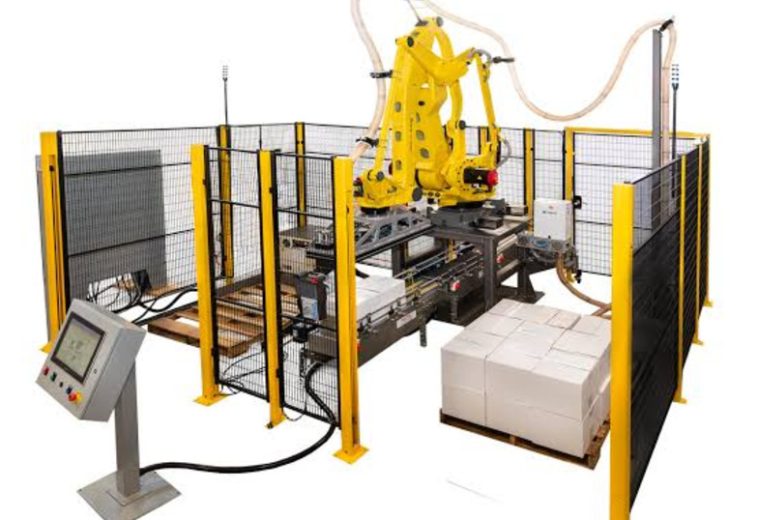
A palletizing calculator is a tool that converts carton and pallet dimensions into boxes per layer, layers per pallet and surface usage, and that result becomes the input specification of a palletizer. One palletizer maker’s calculator takes four carton values and a pallet size, such as the EUR pallet (1,200 x 800 mm / 47.2 x 31.5 in) or the GMA pallet (48 x 40 in / 1,219 x 1,016 mm), and returns a 3D load. The palletizing calculator stops there. The tool counts boxes and never counts the picks a robot makes to place them.
DNC Automation engineers, supplies and commissions palletizing lines for manufacturers in Malaysia. One pallet of 40 boxes runs through six arrangements, then into picks per pallet and minutes per pallet, then onto the settings of a robotic palletizing cell. Free palletizing software, sorted into four classes, closes the sequence.
What Does a Palletizing Calculator Calculate?
A palletizing calculator calculates how many boxes of one carton size fit on one pallet, in how many layers, under the height and weight limits entered. Four carton values go in: width, length, height and weight. The pallet comes from a list of standard sizes or from a custom entry, and the number of layers sets the load height.
The table below lists what the palletizing calculator takes in and what it returns, using the five result fields that one palletizer maker’s calculator prints.
| Field | Direction | What it describes |
| Carton width, length, height | In | Outer size of the shipping carton, not the retail unit |
| Carton weight | In | Declared mass, used only to total the load |
| Pallet footprint and deck height | In | For example 1,200 x 800 mm with a 144 mm (5.7 in) deck |
| Layers or maximum load height | In | Limit set by the wrapper, the rack or the trailer |
| Units per layer, total units | Out | The arrangement result and its multiple |
| Total height, total weight, surface usage | Out | Height from the deck, summed declared weight, share of the footprint covered |
The calculation itself is floor division on each axis. The pallet length divided by the carton length, rounded down, times the pallet width divided by the carton width, rounded down, gives boxes per layer. The height limit divided by the carton height, rounded down, gives layers. Allowing every carton its own orientation turns the task into a problem that one calculator publisher classes as NP-hard (no fast general method is known), so its tool restricts itself to same-orientation stacking, which leaves six arrangements to compare.
Counting boxes is half of a robotic palletizing specification. The other half counts the placements a robot makes, and no calculator page crawled for this keyword states it. Six arrangements give six different counts, so the next step is to see how far apart they land.
How Do Pallet Size and Carton Orientation Set the Boxes per Layer?
Pallet size and carton orientation set the boxes per layer through floor division on each axis, and the same carton gives a different count each time it is turned. The footprint comes first. ISO 6780:2003 sanctions six pallet footprints: 1,016 x 1,219 mm (40 x 48 in), 1,000 x 1,200 mm, 1,165 x 1,165 mm, 1,067 x 1,067 mm, 1,100 x 1,100 mm and 800 x 1,200 mm. A 3PL directory adds that the 1,100 x 1,100 mm square pallet is common in Japan, Korea and parts of Southeast Asia, so an export line to those markets can face a second footprint.
The worked case uses an assumed carton of 400 x 300 x 200 mm (15.7 x 11.8 x 7.9 in) weighing 8 kg (17.6 lb) on a EUR pallet with the load capped at 1,000 mm (39.4 in) above the deck. Every input is assumed for illustration, and none is a DNC project measurement. Turning the carton gives six same-orientation arrangements.
The table below applies floor division to each of the six pallet arrangements of the worked case.
| Vertical side (mm) | Footprint on pallet (mm) | Boxes per layer | Layers under 1,000 mm | Boxes per pallet | Surface usage |
| 200 | 300 x 400 | 4 x 2 = 8 | 5 | 40 | 100 % |
| 300 | 400 x 200 | 3 x 4 = 12 | 3 | 36 | 100 % |
| 300 | 200 x 400 | 6 x 2 = 12 | 3 | 36 | 100 % |
| 400 | 300 x 200 | 4 x 4 = 16 | 2 | 32 | 100 % |
| 200 | 400 x 300 | 3 x 2 = 6 | 5 | 30 | 75 % |
| 400 | 200 x 300 | 6 x 2 = 12 | 2 | 24 | 75 % |
Four of the six pallet arrangements cover 100 % of the footprint, yet the count runs from 32 to 40. Surface usage does not separate them in a palletizing calculator. Layer count under the height limit does.
The 40-box pallet arrangement wins only because 1,000 mm divides evenly by 200 mm. A limit of 1,200 mm (47.2 in), which is 200 mm higher, brings all four full-footprint arrangements level at 48 boxes, so the winner depends on the cap. The limits therefore decide the result as much as the carton does, and the next section tests which one binds.

How Do Pallet Size and Carton Orientation Set the Boxes per Layer?
Which Limit Binds First: Footprint, Height or Weight?
Height binds first in the worked case, because the 40-box load weighs about 345 kg (761 lb) against a safe working load of 1,500 kg (3,307 lb) for a EUR pallet. The load stands 1,000 mm above a 144 mm deck, so the pallet leaves the cell at 1,144 mm (45.0 in). The weight is 40 x 8 kg = 320 kg (705 lb) of cartons plus a pallet of about 25 kg (55 lb).
A binding limit shows which change adds boxes. Raising the height cap by 200 mm (7.9 in) adds one layer of 8 boxes, a gain of 20 %. Raising the weight capacity adds nothing, because the pallet is nowhere near it.
Outside limits arrive from the road. One 3PL directory’s tool page notes that less-than-truckload carriers in the United States cap a pallet position at around 2,000 to 2,500 lb (907 to 1,134 kg) and 72 in (1,829 mm) in height, pallet included. A packaging equipment distributor advises keeping loads under 60 in (1,524 mm) unless the equipment and the carrier allow more. The carrier figures describe one market, so a Malaysian line confirms the cap for each lane before building to it.
Overhang is the fourth limit. One palletizer maker allows overhang of up to 6 in (152 mm) on each side in its calculator, and a distributor warns that boxes hanging over the pallet edge lose up to 30 % of their strength. The 3PL directory’s tool ignores overhang altogether, so the same carton returns different counts in different tools. A cell builds exactly the pattern it is programmed with, which means an overhang chosen in a calculator reaches the pallet only if the pattern program carries it.
The count, the limits and the arrangement together fix the pallet, and a short summary collects them before the palletizer enters the calculation.
Summary So Far: What Has the Palletizing Calculator Settled?
The palletizing calculator has settled four things: the pallet footprint, the carton orientation, the boxes per layer and the layers that fit under the height limit. In the worked case that is 40 boxes at 8 per layer over 5 layers, 1,144 mm (45.0 in) tall and about 345 kg (761 lb). Height is the binding limit.
The calculator has not settled how the 40 boxes reach the pallet. A robot places boxes in picks, and the pick count depends on how many boxes each pick carries. The pick count sets the minutes per pallet.
How Does a Pallet Result Turn Into Picks per Pallet?
A pallet result turns into picks per pallet by dividing the boxes per pallet by the boxes each pick carries, and minutes per pallet then follow from the cycles per minute. DNC’s reference range for a six-axis robotic palletizer arm is 10 to 60 cycles per minute, and that range is applied below to the 40-box pallet.
The table below shows picks per pallet and seconds per pallet for three gripper styles, applying the same cycle rate to each row so that boxes per pick is the only variable.
| Gripper style | Boxes per pick | Picks per pallet | Seconds at 10 cycles/min | At 30 cycles/min | At 60 cycles/min |
| One box per pick | 1 | 40 | 240 | 80 | 40 |
| Two boxes per pick | 2 | 20 | 120 | 40 | 20 |
| Whole layer per transfer | 8 | 5 | 30 | 10 | 5 |
The whole-layer row assumes the layer is formed upstream, because a layer palletizer transfers a full tier in one motion. Layer cells run at their own cycle rates, so the 30-second figure shows the effect of boxes per pick and not a promise of speed. Pallet exchange and slip-sheet placement add dead time on top of every row, and the full cycle is worked in how to calculate palletizer throughput.
The same division runs backwards from the line. A line delivering 20 boxes per minute needs 20 cycles per minute at one box per pick, or 10 cycles per minute at two boxes per pick. At 40 boxes per pallet, that line fills 0.5 pallets per minute, or 30 pallets per hour.
The six calculator pages crawled for this keyword never mention a cycle. The calculator answers a question about the pallet, and the robot is sized by a question about the pick. A boxes-per-pallet figure is not a palletizer specification. A nameplate rate is not a line output either. The pick count also moves with the pattern, which is where the densest arrangement stops being the best.

How Does a Pallet Result Turn Into Picks per Pallet?
Why Does the Highest-Count Pattern Not Always Suit a Palletizer?
The highest-count pattern does not always suit a palletizer because count is only one of three things a pattern has to deliver: boxes per pallet, load stability and a placement sequence the cell repeats cheaply. When palletizing boxes in a column stack, every layer repeats the first, so the program holds one layer pattern and the 40-box case builds five times with the same motion.
A packaging supplier describes the trade in its guide. Column stacking gives the stack maximum strength and tolerates less height before it becomes prone to toppling. Brick stacking switches the footprint on each layer, and interlocking lets more than one box below support the box above. The guide states that brick stacking reduces the number of boxes per pallet and that interlocking allows fewer goods per pallet. A distributor suggests a hybrid, brick in the lower layers and column in the upper ones.
The count cost prices out directly in the worked case. Swapping two of the five 8-box layers for 6-box layers, as a stand-in for an interlocking layer, gives 3 x 8 + 2 x 6 = 36 boxes. The swap removes 4 boxes, a loss of 10 %.
The cost to the cell is harder to price, and the evidence is one line from a calculator publisher. A complex stacking scheme can fit slightly more items, but it lengthens loading and unloading time and raises the cost of palletizing. DNC reads that as a cycle effect: each extra layer pattern is another placement sequence to store, and each rotated box is a turn of the gripper inside the cycle. Palletizing systems from one automation integrator store hundreds of patterns and switch between them automatically, so the program can hold several. The stored patterns still have to be tested, and the shipping stability of an interlocked load is checked against EUMOS 40509:2020, the test method that applies a horizontal acceleration to a palletized unit and measures its deformation.
A pattern is therefore chosen for stability first and count second, and the chosen pattern becomes the first line of the cell specification. The remaining calculator outputs fill the other lines of that specification.
Which Calculator Outputs Become Cell Specifications?
Each palletizing calculator output becomes one cell specification: the layer footprint sets the tool, the box count sets the picks, the total height sets the downstream equipment, the total weight sets the verification and the pattern sets the program. DNC recommends fixing picks per pallet before boxes per pallet when a palletizing cell is specified.
The table below maps each calculator output of the worked case to the cell specification it feeds and the point to check.
| Calculator output | Cell specification it feeds | Check |
| Boxes per layer (8) and layer footprint (1,200 x 800 mm) | Gripper or layer-tool width; boxes the infeed must gather | Tool fits the footprint with clearance |
| Boxes per pallet (40) | Picks per pallet; cycles per minute; pallets per hour | Cycle rate covers the line rate |
| Total height (1,144 mm) | Discharge conveyor height; wrapper clearance | Wrapper rated for the pallet height |
| Total weight (about 345 kg) | Pallet safe working load; weight verification | Declared weight compared with measured weight |
| Pattern and alignment | Pattern program in the controller | One program per carton and pallet pair |
| Overhang | Pattern setting | Permitted, or zero |
Total height carries the most downstream weight. A pallet that leaves the cell at 1,144 mm (45.0 in) enters a pallet wrapping machine whose maximum load height has to cover it, and an extra layer won by raising the cap moves the wrapper requirement with it. DNC engineers integrate the palletizer, the conveyor and the wrapper as one sequence for this reason. Across automotive, food and beverage, and glove manufacturing lines in Malaysia, DNC’s engineers have specified palletizing as one station in an end-of-line sequence that also holds the wrapper and the checkweigher.
Total weight is a declared sum. The calculator multiplies the carton weight typed in by the number of boxes, and nothing in a calculator weighs a carton. A placement program that reads case weight from master data has the same blind spot, and a checkweigher upstream of the cell is the station that measures what the cartons weigh. Premier Tech’s tool lets the user download the result, and that file is the cell specification’s first draft.
A calculator therefore ends where a pattern program begins, and the software that links the two is the last question.
Where Does Free Palletizing Software Stop and Robot Cell Software Start?
Free palletizing software stops at the pallet pattern, and robot cell software starts where the pattern becomes a program for a named controller. The software on the first page of results falls into four classes, shown in the table below with one example each and the point where each stops.
| Class | Question it answers | Example in the results | Stops at |
| Geometry calculator | How many boxes fit on one pallet | A palletizer maker’s browser calculator; a calculator publisher’s tool | Count, layers, 3D view |
| Pattern design software | Which pattern suits a given pack | TOPS Pro, an offline desktop tool for packaging engineers that ranks hundreds of pack-out scenarios | The pattern, not a live order |
| Load and order planning | How pallets and trucks fill for each order | Cube-IQ, a 3D load engine covering pallet, truck and container | Pallet count and load diagram |
| Robot cell software | How a robot builds the pattern | PalletSolver; KUKA.PalletTech; a cell configurator that takes box and slip-sheet sizes | The robot program |

Where Does Free Palletizing Software Stop and Robot Cell Software Start?
Robot cell software is where free palletizing software gets specific. PalletSolver, from a robot maker, offers a free download with training. The tool imports carton data from Excel or CSV files, takes gripper zones and cell stations, and generates patterns offline. Its export of XML files to three named robot controllers is listed under the full version, so the free tier ends at the pattern.
KUKA.PalletTech generates the robot program for a configured cell without deep robot programming knowledge, and it targets unmixed articles. For mixed boxes, one Malaysian cobot integrator’s software computes placement coordinates in real time from the dimensions and weight of each incoming box, and a comparison guide calls fully automated mixed-case palletizing one of the hardest problems in warehouse robotics.
The calculator and the cell program should agree. If a program places 38 boxes where the calculator shows 40, the two use different limits, and the difference is found by comparing overhang, height cap and orientation line by line.
DNC recommends running the calculator first and keeping its output as the check on the cell program. For a Malaysian line planned under NIMP 2030, speak with a DNC engineer about turning the calculator result into a picks-per-pallet specification. The calculator result, the pattern and the cell program meet in five recurring questions, answered next.
What Do Engineers Ask About Palletizing Calculators?
Engineers ask five questions about palletizing calculators more than any others, beginning with how many boxes fit on a pallet, and each answer rests on the worked case above.
How many boxes fit on a pallet?
Boxes per layer multiplied by the number of layers gives boxes on a pallet. The worked case fits 8 boxes per layer over 5 layers, which makes 40 boxes on a EUR pallet under a 1,000 mm (39.4 in) cap. A different carton orientation changes the count, so a calculator compares all six arrangements.
How do you work out the layers on a pallet?
The layers on a pallet equal the height limit divided by the carton height, rounded down. A 1,000 mm (39.4 in) cap over a 200 mm (7.9 in) carton gives 5 layers. The limit runs from the pallet deck, and a 144 mm (5.7 in) EUR deck adds to the overall height.
Which pattern suits palletizing boxes?
Column stacking suits palletizing boxes that need the highest count, and brick or interlocking patterns suit boxes that need a steadier load. A supplier guide states that brick and interlocking patterns reduce boxes per pallet, and a hybrid of brick below and column above is one answer. The final choice follows the load stability test.
Is palletizing software free?
Palletizing software is free at two levels: geometry calculators in a browser and some robot cell software as a free download. PalletSolver’s free download generates patterns offline, and its XML export to robot controllers sits in the full version. Load planning and pattern design software are separate products.
Can boxes overhang the pallet?
Boxes overhang the pallet within a limit that the calculator and the cell program both carry. One palletizer maker allows up to 6 in (152 mm) on each side, and a distributor reports that overhanging boxes lose up to 30 % of their strength. The overhang setting belongs in the pattern program as well as the calculator.
- 0 views
- 0 Comment
Recent Comments